The short answer
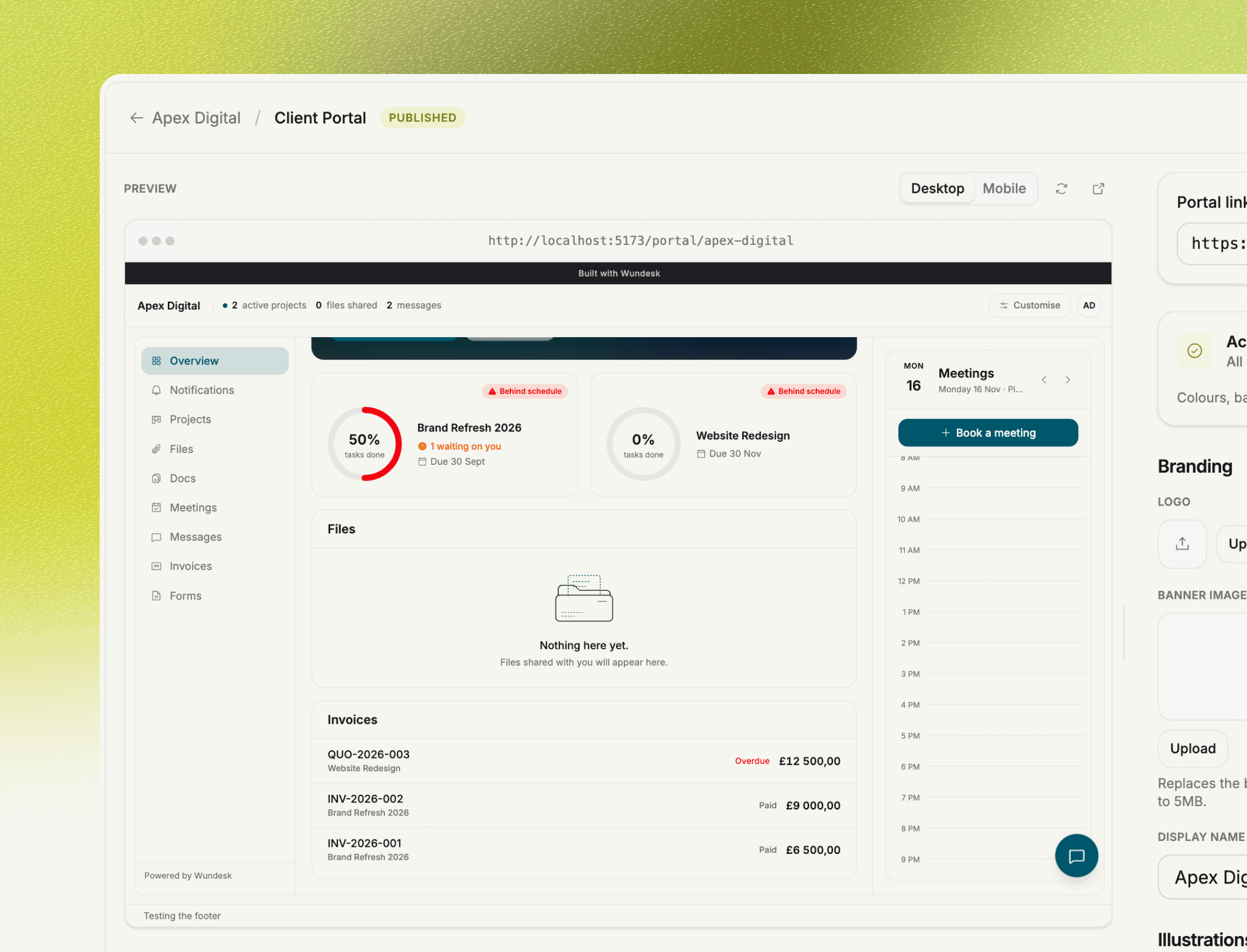
A client portal is a private page, one per client, where they can see the project's progress, download files, read and sign documents and find their invoices. You stop sending those things by email, and they stop asking where things are.
A client portal is a private, branded page where your client can find everything about their project in one place: the work in progress, the files you have shared, the documents waiting for them, and a way to reach you. Most freelancers do not need one for a single small job, but once you are juggling several clients and several projects, a portal usually saves more time than it costs to set up.
What is a client portal?
Think of it as a front door for each client. Instead of sending files by email, updates by message and invoices as attachments, you point the client to one address. They open it and see what is theirs, and only what is theirs. Because it carries your logo and colors, it also looks like part of your business rather than a third-party tool they have to learn.
A portal is not the same as a shared folder. A folder holds files, but a portal can also show where the project stands, which tasks need the client's attention, documents to review or sign, forms to fill in, and invoices. The difference is that the portal tells the client what to do next, while a folder only stores things.
What does a client portal usually include?
Most portals cover the same handful of needs. There is a project view, so the client can see which stage the work is in. There is a place for files, so the latest version is never buried in an email thread from three weeks ago. There are updates from you, written for the client rather than for yourself. And there are the practical pieces of working together: documents such as a proposal or contract, forms to collect information, a way to book a call, and invoices.
What matters is not how many of these a portal has, but whether the client can answer their own questions without writing to you. Every question a client can answer by looking is one email you do not have to read and reply to.
Why do clients send so many "where are we at?" emails?
Clients do not ask for updates because they doubt you. They ask because they cannot see anything. When work happens out of sight, a few days of silence feels long, and a quick message feels harmless. Multiply that by five clients and you spend a surprising part of the week writing status replies.
A portal changes the default. The status is already there when the client looks, so the question rarely needs to be asked. Many freelancers find that the biggest benefit is not saved time but calmer clients, since people worry less when they can see progress for themselves.
Do freelancers actually need a client portal?
It depends on how you work. If you have one or two small clients a year and everything fits in a short email thread, a portal is probably more than you need. A tidy folder and a clear weekly message will do the job.
A portal starts to earn its place when you have several active clients at once, when projects run for weeks rather than days, when more than one person on the client's side needs to see things, or when you spend noticeable time chasing files, approvals and payments. It also helps if you want to look more established than a string of email attachments suggests, which matters most to freelancers who are growing.
What should you look for when choosing one?
The test is whether your client can use it without instructions. If they need an account, a password and a tutorial, you have only moved the friction. Look for something that opens from a simple link, shows your branding, lets you choose exactly what each client sees, and does not bury you in features you will never use. It is also worth checking whether it is priced for a solo freelancer rather than for a team of twenty.
Related content:
A calmer way to work with clients
When clients always know where things stand, the whole relationship gets easier. There are fewer anxious messages, fewer lost files and fewer moments where someone says they never received something. You spend more of your day doing the work you were hired for, and clients feel looked after because they are. That feeling, more than any feature, is why people stay with a freelancer they trust.
Try it with Wundesk
Wundesk is a client and project management platform for freelancers and small studios that gives every client their own branded portal, opened from a link you share, with no account for them to create. It is in beta, with access opening in January 2027.
Join the waitlist to get early access.
Written by
Nikki Bell · Founder, Wundesk
Product designer who freelances. Building Wundesk to replace the stack of tabs between a brief and a paid invoice.
Connect with Nikki